
Download Zombs Royale – Free Browser Battle Royale Shooter
Overview
Zombs Royale is a fast‑paced, top‑down battle‑royale shooter that you can launch directly from any modern web browser. Developed by End Game, this free online multiplayer title captures the core tension of games like Fortnite and PUBG while stripping away heavy graphics and build mechanics. Instead, you rely on quick reflexes, smart positioning, and a handful of weapons and consumables scattered across a sprawling map filled with houses, crates, and the occasional zombie.
Each round pits up to 50 players against one another in Solo, Duo, Squad, or the surprise‑filled Mystery Mode. A shrinking toxic circle forces combat, while loot drops, chests, and enemy scavenging keep the action fluid. Registration is optional, but creating an account unlocks a profile, cosmetic shop, and friend system, giving you a more personalized experience.
Whether you’re a casual browser gamer or a seasoned royale veteran, Zombs Royale offers a low‑entry, high‑adrenaline way to prove you can be the last one standing.
Gameplay Mechanics, Core Features & Pros/Cons
Key Gameplay Elements
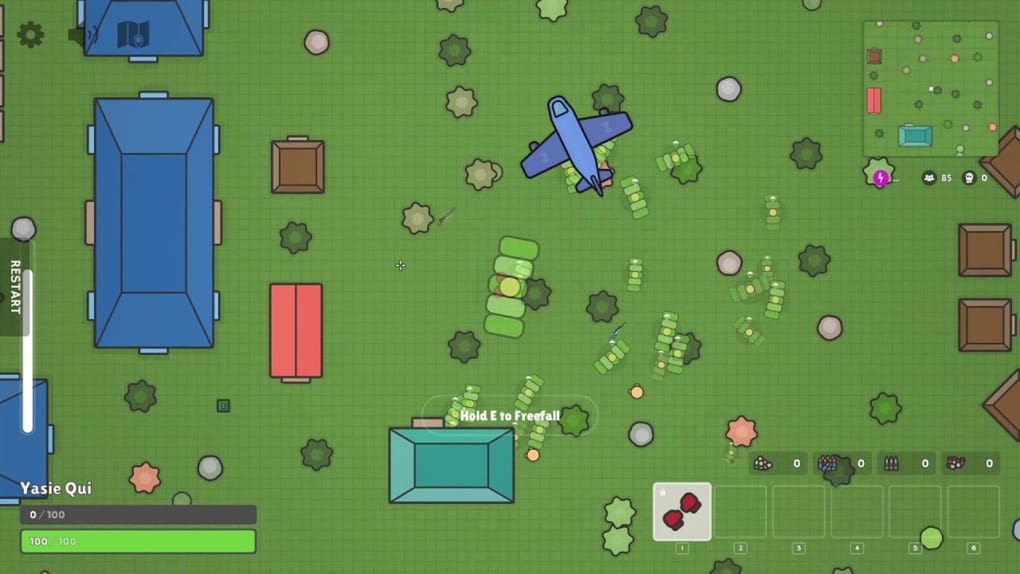
The game’s top‑down perspective makes situational awareness immediate. You parachute onto the island, land near a building, and start scavenging. Weapons are limited to a primary and a secondary slot, while you also have three inventory spaces for medkits, potions, or extra ammo.
The lack of armor means you’ll rely heavily on health‑boosting items, making the timing of fights crucial. The poisonous gas that shrinks each minute creates a natural “storm” that drives players together, encouraging aggressive encounters or strategic camping in safe zones. Since you cannot build structures, every cover decision—whether behind a wall, under a bridge, or inside a house—becomes a tactical choice.
Feature List
- Free-to-play, no download required – runs in any HTML5‑compatible browser.
- Four distinct game modes: Solo, Duo, Squad, and Mystery Mode.
- Supports up to 50 players per match for chaotic, large‑scale combat.
- Top‑down view with simple, colorful graphics that load instantly.
- Variety of weapons: pistols, rifles, shotguns, and melee options.
- Healing items, potions, and ammo drops scattered across the map.
- Dynamic toxic‑gas circle that forces player movement.
- Optional account registration for profile tracking, cosmetics, and friends.
- Regular seasonal updates introducing new maps, skins, and limited‑time events.
- Cross‑platform compatibility – play on Windows, macOS, Linux, or ChromeOS.
Pros
- No installation required: Instantly accessible from any browser.
- Low system requirements: Runs smoothly on older PCs and laptops.
- Fast matches: Games typically finish within 10‑12 minutes.
- Simple controls: Ideal for both beginners and seasoned shooters.
- Regular content updates: Keeps the experience fresh and engaging.
Cons
- Limited graphics compared to high‑end battle‑royales.
- No building mechanics may feel restrictive for fans of Fortnite‑style play.
- Only five inventory slots can feel cramped in later stages of a match.
- Ads may appear on the free web version, though they’re non‑intrusive.
- Occasional server lag during peak hours can affect latency.
Installation, Setup & Compatibility
How to Download (or rather, Access) Zombs Royale
Because Zombs Royale is a browser‑based title, there is no traditional download or installation process. To start playing, simply open a modern browser such as Chrome, Firefox, Edge, or Safari, and navigate to the official site (https://zombsroyale.io). The game loads in seconds thanks to lightweight WebGL rendering. If you prefer a shortcut, you can create a desktop bookmark or add the site to your browser’s “apps” folder for one‑click access. For mobile users, the same URL works on Android and iOS browsers that support WebGL, delivering a comparable experience without the need for an app store download.
Step‑by‑Step Usage Instructions
- Open the website: Visit https://zombsroyale.io on your preferred browser.
- Choose a mode: Click Solo, Duo, Squad, or Mystery Mode from the main menu.
- Set your nickname: You can play anonymously or register for a permanent account.
- Enter the lobby: Wait for the match to fill; you’ll see a mini‑map and player count.
- Jump from the plane: Click the “Jump” button when the plane flies over your desired landing spot.
- Scavenge and survive: Collect weapons, ammo, and health items while staying inside the safe zone.
- Engage opponents: Use the mouse to aim and click to fire; press “R” to reload.
- Stay alive: Keep moving as the toxic gas closes; the last survivor wins.
Compatibility Details
Zombs Royale runs on any operating system that supports a recent version of Chrome, Firefox, Edge, or Safari, including Windows 10/11, macOS Catalina and later, Linux distributions with GTK, and ChromeOS. The game is also optimized for mobile browsers on Android 8.0+ and iOS 13+. Because it relies on HTML5 and WebGL, there’s no need for additional plugins or Java installations.
Performance Tips
To ensure smooth gameplay, clear your browser cache regularly, close unnecessary tabs, and enable hardware acceleration in your browser settings. On lower‑end devices, you can reduce the graphics quality from the in‑game settings menu, which lowers particle effects and shadows without sacrificing core gameplay. A stable internet connection (minimum 3 Mbps) is recommended to avoid lag, especially during high‑traffic periods when many players are joining simultaneously.
Frequently Asked Questions
Is Zombs Royale completely free or are there hidden costs?
The core game is 100 % free. You can play without an account, and all weapons, maps, and modes are available at no charge. Optional cosmetic items and a premium shop exist, but purchases are purely aesthetic and do not affect gameplay balance.
Can I play Zombs Royale on my smartphone?
Yes. The game runs on mobile browsers that support WebGL (Chrome on Android, Safari on iOS). Controls are adapted for touch, allowing you to aim, fire, and move using on‑screen joysticks.
Do I need to register to access the friend system?
Registration is required only if you want to use the friend list, access your personal inventory, and purchase cosmetics. Guest players can still join matches and earn loot, but progress isn’t saved between sessions.
What browsers provide the best performance?
Google Chrome and Microsoft Edge currently offer the smoothest experience due to their robust WebGL implementation. Firefox and Safari also work well, but you may notice slightly higher frame times on older versions.
Is there any cheat protection or anti‑hack system?
End Game employs server‑side validation and frequent security patches to deter cheating. While no system is 100 % foolproof, accounts found using third‑party hacks are banned promptly.
Conclusion & Call to Action
Zombs Royale delivers the thrill of a battle‑royale showdown without the heavy download size or demanding hardware requirements of its 3D counterparts. Its fast matches, intuitive controls, and cross‑platform accessibility make it an ideal choice for anyone looking to squeeze a quick, adrenaline‑filled session into a coffee break or a longer gaming night. While the graphics are intentionally simplistic and the inventory limited, these design decisions keep the focus squarely on tactical movement and sharp shooting. Whether you’re a casual browser gamer or a competitive shooter seeking a low‑commitment arena, Zombs Royale offers a polished, regularly updated experience that rewards skill and strategy.
Ready to jump into the fray? Click here to launch Zombs Royale instantly and test your survival instincts. Register for a free account to unlock cosmetics, track your stats, and add friends for future squads. The battlefield is waiting—be the last one standing!



.png)



